<link rel="stylesheet" href="styles-55BDGNYU.css">

An appointment calendar that stays out of your way

The calendar is the place the salon returns to all day. Reception books a client during a phone call. A specialist checks the next service between appointments. The owner looks at where free hours remain. Rewi combines these needs in one calm view.

14 days free. No credit card. We will transfer your data from Booksy, Versum or another system for free.

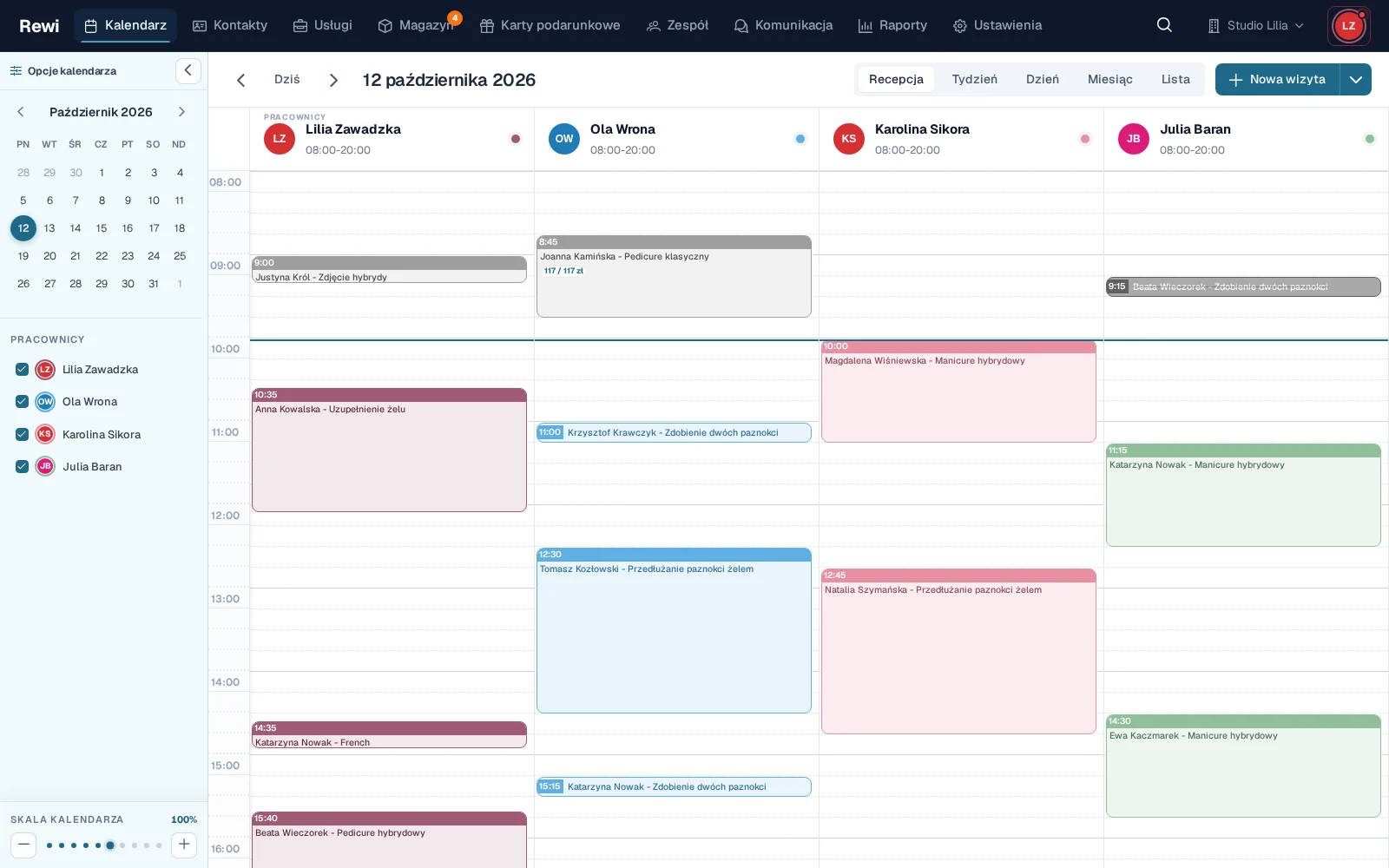
Rewi calendar in reception view: the schedule of staff and rooms for one day, with times, client names and service names
Rewi calendar in the reception view for Studio Lilia: columns for four staff members with appointments, clients and services

See the salon's day without piecing it together from several screens

The Reception view shows many staff members side by side. You can see at once who is working, where there is a free slot and how to fit in a longer service. Day, week, month and list views are also available.

Each appointment contains the time, client, services and assigned employee. Colors can match services or people. The appointment status helps tell a pending, confirmed, completed or canceled booking apart.

You don't need to open several tables to understand the plan. The most important information stays next to the time slot. Details are available once you open the appointment.

Move appointments when the day changes

In a salon the schedule rarely stays still. A client asks for a later time. A service takes longer. An employee starts the shift later. In Rewi you can drag an appointment to a new time and adjust its length.

The change goes into the shared calendar. There is no need to cross out the old entry or retype client details. The system can also send a message about the time change using your configured template.

Rewi checks the availability of the employee and related resources. If a service needs a specific room, chair or device, the calendar helps avoid double booking. This matters in salons where one machine serves several specialists.

Connect working hours with available slots

Each employee can have their own schedule. You set working hours, vacations and other absences. Recurring blocks close off time for training, tidying up a workstation or a regular break.

This information affects the calendar and online booking. The client sees slots based on the real schedule, not on general opening hours. Reception doesn't need to remember that one person works shorter hours on Wednesdays.

Polish holidays and days off are visible while planning. You can review an unusual week in advance and change the team's availability.

Add appointments with the right context

When booking you choose the client, service, employee and time. Price and duration come from the current price list. If the client has used a similar service before, the history helps you quickly recreate the needed set.

The appointment card can lead to client data, documents, photos and billing. The calendar is not a separate diary detached from the rest of the salon. It is the entry point to handling the whole visit.

Once finished, you can bill services and products, record payment methods and move on to the next appointment. Reports use the same data, so the owner doesn't copy the day into a spreadsheet.

Work on desktop and phone

Reception needs a wide view of several columns. A specialist more often checks her day on a phone. Rewi adapts the interface to both situations.

On a phone you can quickly check the order of appointments and client details. Push notifications inform the employee about new bookings. Installing it as a PWA app keeps Rewi at hand without hunting for a browser tab.

A calendar should save your attention

A good schedule doesn't win by piling on decoration. It wins when reception sees a free slot immediately. Rewi bets on a fast, clear calendar and actions without unnecessary screens.

This is especially important during a phone call. The client doesn't want to wait for the system to reload the day. The employee should find a slot, check the service and book the appointment in a single conversation.

Try the Rewi calendar for 14 days. The trial is free and requires no credit card.

Frequently asked questions

Can't find your question? Write to [email protected].

Does Rewi have a view for multiple employees?

Yes. The Reception view shows several people's calendars side by side. Day, week, month and list views are also available.

Can I drag appointments?

Yes. You can move an appointment to another time and change its length without re-entering the data.

Does the calendar track room and equipment availability?

Yes. Services can use resources such as a room, chair or device. Rewi detects time conflicts.

Does an employee's schedule affect online booking?

Yes. Working hours, vacations and absences limit the slots available to clients.

Does the calendar work on a phone?

Yes. Rewi works in the browser and can be installed on a phone as a PWA app.

Test Rewi
free for 14 days.

See how Rewi works in the everyday running of a salon. No credit card, and setup takes a few minutes.

We will move your data from your previous system for you, free of charge.