<link rel="stylesheet" href="styles-55BDGNYU.css">

Before and after photos organized by client

Treatment photos should not get mixed with a private phone gallery. Rewi stores them on the client card and can link them to a specific appointment. The team goes back to earlier results together with the service history, without hunting for files by date.

14 days free. No credit card. We will transfer your data from Booksy, Versum or another system for free.
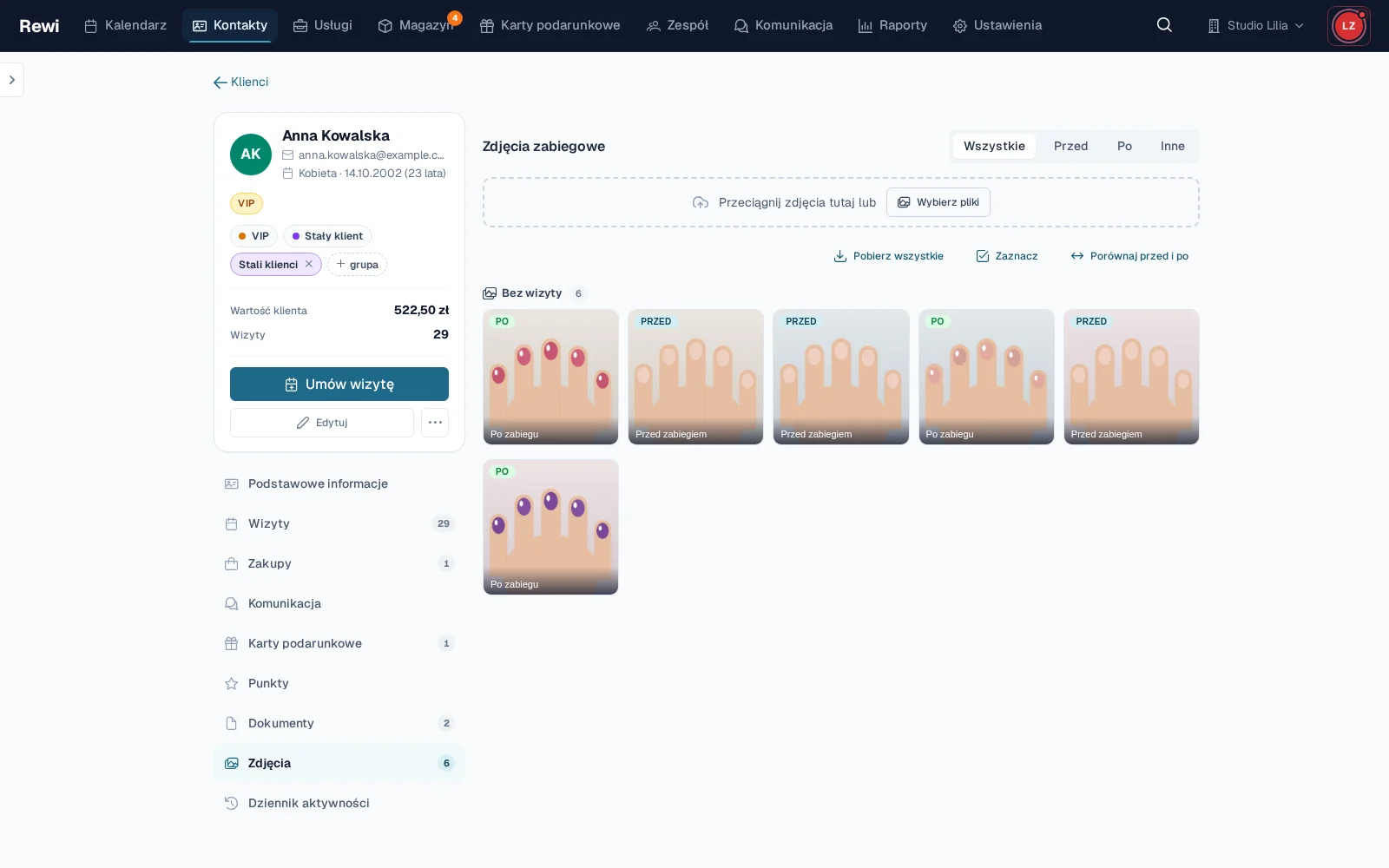
A client photo gallery in Rewi grouped by appointments, with before and after labels

Add photos while handling an appointment

You can add a photo from the appointment and assign it to the right client right away. Rewi supports common image formats and files from a phone. Several shots can be uploaded at once.

Each file can get a category of “before”, “after” or “other” and a short description. Labels make it easier to find a pair later, even when one appointment has many photos.

See the full history on the client card

The “Photos” tab collects all of a person’s documentation. The gallery can group shots by appointment and shows the date taken. Separate filters let you focus on photos from before or after the treatment.

The thumbnail gives a quick overview, and the larger preview lets you move between files without closing the gallery. An authorized person can fix the category or description if a photo was added in a hurry.

Compare two shots in one view

To compare, you pick exactly two photos. Rewi orders the pair so the “before” shot ends up on the left. The side-by-side view shows the overall change well.

The slider mode overlays the photos and lets you reveal a chosen area. Shared zoom, pan and rotation help you examine the same spot on both shots. A similar frame and lighting give the best result.

Download single photos or the whole set

Every photo can be downloaded in its original form. The gallery also lets you select several files or download all visible shots as one ZIP archive. This is handy when passing on documentation or making a backup.

Rewi does not publish client photos externally. Files are downloaded through the app after authentication, and access depends on the module and the staff member’s permissions.

Set a calm documentation standard

It is worth deciding when the team takes a photo, how it words the description and which shot it labels “before” or “after”. A consistent distance, angle and light make comparison easier than a large number of random photos.

The salon should set its own rules for taking, storing and using photos. Rewi helps organize files and access, but does not decide for the salon which consents are required.

Try Rewi for 14 days. The trial is free and requires no credit card.

Frequently asked questions

Can't find your question? Write to [email protected].

Where are treatment photos stored?

Photos go to the client card. They can also be linked to a specific appointment.

Can I label a photo as “before” or “after”?

Yes. The categories “before”, “after” and “other” are available, plus an optional description.

How does photo comparison work?

You pick two shots and open them side by side or in slider mode. You can zoom, pan and rotate them together.

Can I download several photos at once?

Yes. Selected photos or the whole visible gallery can be downloaded as a ZIP archive.

Can every staff member see the photos?

Access depends on the enabled module and the permissions assigned to the staff member’s role.

Test Rewi
free for 14 days.

See how Rewi works in the everyday running of a salon. No credit card, and setup takes a few minutes.

We will move your data from your previous system for you, free of charge.